Chapter 24 laid out the seven-stage pipeline. Stage 2 of that pipeline, SLAM processing, fuses “the raw sensor returns into one registered point cloud.” This chapter covers what produces those returns: the five sensors bolted to the mapping vehicle, what each one contributes, where it sits on the rig, and the frames that keep its measurements in register.
Get any of that wrong and the pipeline does not fail loudly. A LiDAR mounted three centimeters off where you recorded it, a camera stamping frames on a clock that runs a few milliseconds ahead, a wheel encoder built for a tire you no longer have: each one bends the cloud in a way that looks like geometry. The cloud still renders. The curb is still there. It is just five centimeters to the left of the paint.
Why the suite matters
Of the four questions from Chapter 2, this chapter serves the first two. Where am I? comes out of the LiDAR, GNSS, IMU, and wheel encoder fused into one trajectory. What is around me? comes out of the LiDAR and the camera. Both answers land in the same artifact, a georeferenced point cloud in register, and everything downstream in Part VI is drawn on top of it.
The suite also sets the ceiling on your accuracy before you leave the driveway. No amount of careful tracing recovers geometry that was never measured correctly. You cannot fuse what you cannot time, and you cannot time what you never stamped.
The five sensors
360 degree mechanical LiDAR. The structural sensor. It fires laser pulses and times their returns, the mechanism Chapter 7 covered, and because the unit spins, every return carries a known azimuth. Mounted to sweep a full circle horizontally, it delivers distance measurements in every direction the vehicle travels. Everything else on the rig exists to put those measurements in the right place at the right time.
GNSS. A position, in latitude and longitude, on the WGS84 ellipsoid, several times a second. GNSS alone drifts, multi-pathes off container stacks, and drops out under a gantry. Its job is not to be the answer. Its job is to be an absolute reference the rest of the rig can be tied to, so the finished map lands in a real coordinate system instead of a private one.
IMU. Accelerations and angular rates, at hundreds of hertz. The IMU is the only sensor on the rig that still works when the others go blind, and it is also the one that drifts fastest when it is on its own. The two facts are the same fact: it measures change rather than position, so it carries the trajectory between GNSS fixes and between LiDAR scans, and unaided its error grows without bound. Fuse it, never trust it alone.
Wheel encoder. A pulse per revolution of a wheel, converted into distance traveled. It is the cheapest sensor on the rig and the easiest to abuse: tire pressure, a replacement tire of a slightly different diameter, or a wet yard all turn odometry into a plausible lie. As one input among several it constrains the trajectory. As the answer, it walks.
Camera. Pixels, not geometry. A camera does not tell you where anything is; it tells you what things look like, at a resolution LiDAR cannot match. For map making it contributes colorization, draping image color onto the cloud so a human can recognize a dock face from a sign, and semantics, reading a speed limit or spotting a faded stop bar. It is also the sensor most likely to be mistimed, for a reason covered below.

Two sensors we set aside
The rig in the figures also carries a frequency-modulated continuous-wave LiDAR, FMCW, and a 360 degree Doppler radar. Both are on the vehicle. Neither builds the map, and the reason is not that they are worse.
They answer a different question. An FMCW LiDAR measures range and radial velocity for every return, so it knows how fast each thing it sees is moving away or approaching. A Doppler radar measures the velocity of everything moving in view, through dust and rain that blinds optical sensors. Both are aimed at perception: what is around me, and is it moving. Map making consumes registered geometry. Velocity per return does not change the shape of the cloud you are building, and the perception stack that wants it is a system that consumes the map, not one that produces it.
Mounting, frames, and base_link
Every measurement on the rig is expressed in the frame of the sensor that made it, and every one of those frames sits somewhere else on the vehicle. Spacing and orientation therefore matter twice: once for what each sensor can see, and once for the arithmetic that has to combine what it saw with everything else.


The origin
To combine those frames the rig needs a single origin, and the convention is base_link: the projection to the ground midway between the rear wheels. +X points forward, +Y to the left, +Z up.
The rear axle rather than the middle of the vehicle is deliberate. The vehicle’s kinematics are written against that axle, so distance traveled along the ground lands on the origin without a correction, and the origin stays on a surface you can put a tape measure on.
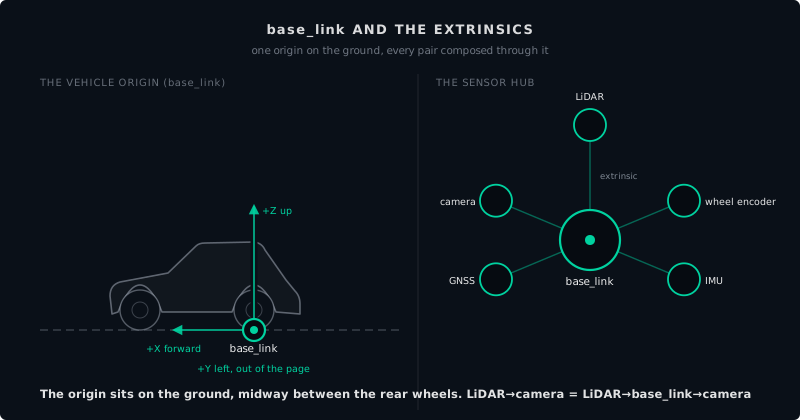
The extrinsics
Each sensor frame relates to base_link by one fixed, calibrated relationship: its extrinsic, the rotation and translation from base_link to that sensor. One sensor, one extrinsic, solved once when the rig is built. Chapter 8 covered how it is solved: boresighting, a figure-eight drive, a lever arm measured to the antenna. It is solved before capture, not per survey, and it is redone whenever a sensor moves.
Chapter 5 defined the frames this sits on. Field Capture, Chapter 8, covers the survey planning, loop closures, and rig calibration this chapter deliberately does not repeat: plan the route, calibrate the rig, then come back here and read the suite you are driving.
Three things that bite
A global shutter and a rolling shutter differ in time
A global shutter exposes every pixel in the array at the same instant. A rolling shutter exposes it line by line, so the top of the frame and the bottom of the frame were taken at different moments. On a moving vehicle that difference is motion: at 10 m/s with a 30 ms readout, the bottom of the frame was captured 30 cm ahead of the top.
For map making the consequence shows up in colorization. Draping a rolling-shutter frame onto the cloud without per-line time offsets puts color a few centimeters off the geometry it is supposed to describe. Chapter 8 covers the compensation; choosing a global-shutter camera is the version where you skip that step entirely.
Mechanical against solid-state LiDAR
A mechanical LiDAR spins, and the spin is part of the measurement. Every return’s azimuth comes from the mirror’s angle at the instant of the pulse, and one revolution is a full surround. A solid-state LiDAR has no moving parts and a fixed field of view: more durable, no spinning assembly, and no 360 degrees.
Two consequences for map making. A fixed field of view means one unit does not see behind the vehicle, so the rig mounts several units or accepts the gap. And without a spinning reference, per-point azimuth leans harder on the vehicle’s own motion, which puts more weight on the extrinsics and on the IMU. For a rig that drives the same route repeatedly, the mechanical unit’s surround and its well-understood timebase are still the easier trade.
Every point carries its own timestamp
A scan is not a snapshot. A mechanical unit takes 50 to 100 ms to complete a revolution, and the vehicle moves during it. At 10 m/s, the last return in a 100 ms scan was measured a full meter from the first.
So each point carries its own timestamp, and registration uses it: every return is placed at the vehicle’s pose at the instant that return was measured, not the pose when the scan started or ended. This is also why the IMU earns its place on the rig. It supplies the pose between GNSS fixes, at the rate the LiDAR is producing points.
Try this
[10 min] Take the sensor list from a rig you have access to, or from any published dataset, and sort it into the two piles this chapter uses: what contributes to the registered point cloud, and what contributes to understanding the scene. For anything in the first pile, name where it sits relative to base_link and how you would learn that number. Everything you cannot name is your boresighting checklist.
What comes next
The rest of Part VI takes this suite out for a drive. Those chapters are still being written, and the table of contents marks them as planned.
Part VII picks up the other end of the pipeline: the vehicle that loads the finished map, localizes against it, perceives around it, and plans a route through it.
Found an error or have a suggestion?
Report an erratum or send feedback →